
Update:
Whereas Iridium has not removed the Certus 1.0 network yet, any new SPaaS customers will be provided only with the Certus 2.0 network, as this is the standard. In IBIS platforms that were created before the introduction of Certus 2.0, Certus 1.0 will still be available although no new activations or user profiles should be done on this network.
It is possible to completely remove the Certus 1.0 network from an SPaaS IBIS platform so that customer employees can’t select this by mistake. Please contact Digital Skies Support to implement this.
Background information
Certus transmission speeds are increasing, and can reach up to 704 Kbps (depending on the equipment). In order for the network to be able to handle high throughput from a large number of devices, Iridium has built a new network for Certus: Certus 2.0 and has reserved IP addresses for all activated SIM cards.
The network has mirrored IP addresses, for example: Certus 1.0: 72.30.12.135 (current) Certus 2.0 (new) : 72.31.12.135. Important: Iridium has reserved these mirrored IP addresses of SIM cards activated on the Certus 1.0 network in their Certus 2.0 network.
For every SPaaS customer a Certus 2.0 network has been created.
Important: all IP addresses must be updated before March 22, 2022. All new activations must be done on the Certus 2.0 network as well.
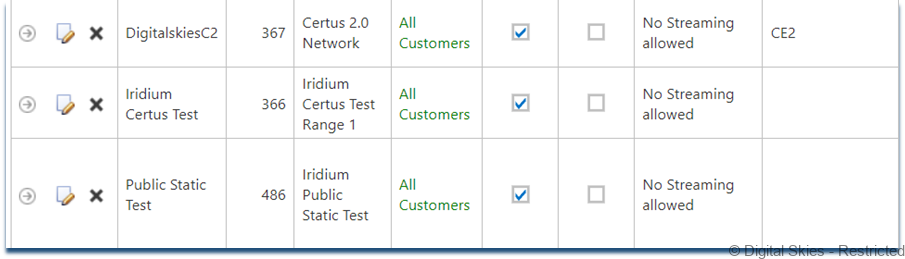
It is possible to migrate from the Certus 1.0 network to the Certus 2.0 network in IBIS, with a tool built to migrate all IP addresses in bulk. Migrating from Certus 1.0 to Certus 2.0 will retain a NAT public IP address on the User Profile, should you have this.
Prior to doing the bulk migration Digital Skies recommends to:
- do an activation and on the Certus 2.0 network to ensure the network is fully functional end to end
- do a test migration with one SIM card
The tool is available under the [Provisioning] menu, Certus.
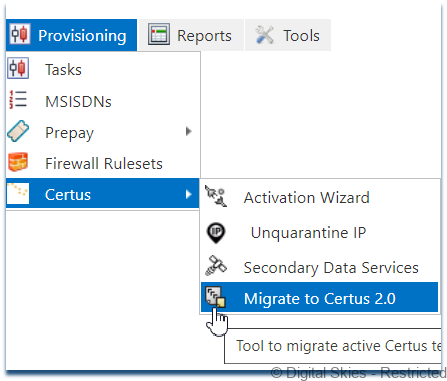
For colocation only customers that provision via SP-Net: please see the bottom of the page for specific instructions
Bulk migration
Select your current Certus 1.0 PoP network in the drop down box and then click [Auto select]. The tool will now automatically fill in all ICCIDs that are still on the Certus 1.0 network, and it will automatically add the new mirrored IP addresses on the Certus 2.0 network.
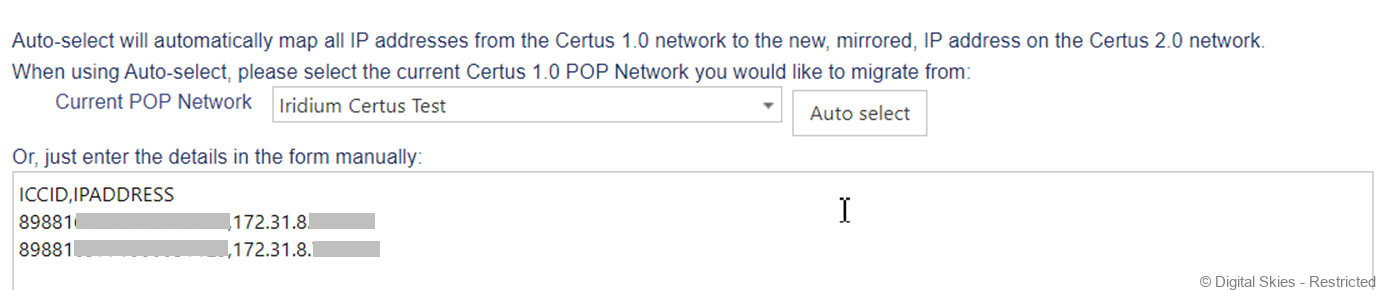
On the bottom of the page, select the Iridium Certus 2.0 network and the Certus 2.0 PoP network

After selecting the correct networks, press [OK] on the bottom of the screen.
________________________________________________________________________________________________
Individual /manual SIM card migration
- Note down the ICCID and the IP address of the SIM card to migrate
- Change the IP address to the mirrored IP address that is used on the Certus 2.0 network
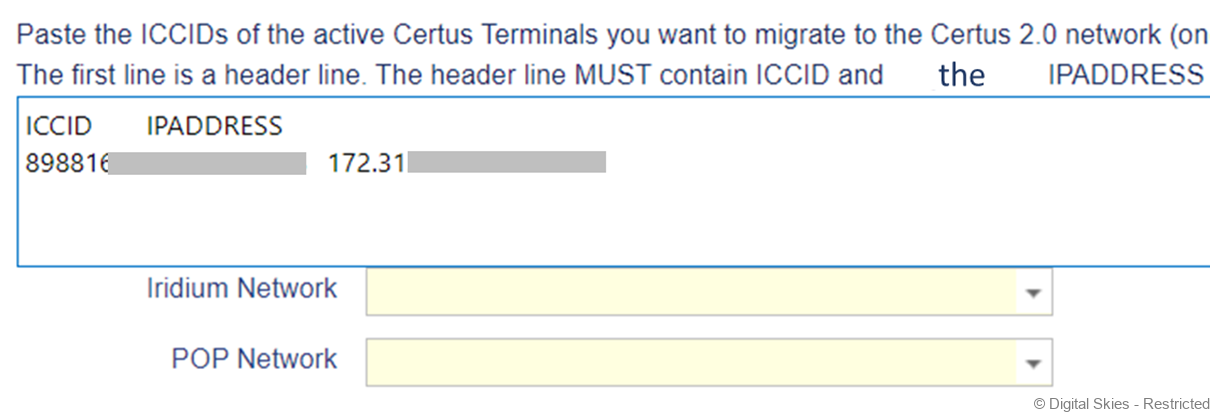
- Paste the ICCIDs and the IP addresses into the migration screen, separating them by tab or comma
- Select your Iridium network and the PoP network
- Press OK
________________________________________________________________________________________________
Colocation only customers:
- Perform the migration from Certus 1.0 to Certus 2.0 in SP Net as per the instructions provided by Iridium.
- In an Excel sheet or Notepad, make a note of every ICCID and the new IP address.
- Synchronize each SIM card with SP Net with the synchronize button on the Card Details screen.
- When done, you can either use the bulk migration tool by using [Auto select] or paste the ICCIDs followed by a tab or comma and the IP addresses in the migration tool as per the screenshot above. Use one line per ICCID. Then, select the Iridium network and the PoP network and press OK.
Important:
For activations on the Certus 2.0 network if not all existing active SIM cards have been migrated to Certus 2.0: when activating a Certus SIM card, please do not use [auto assign] but use an IP address for Certus 2.0 that is not already in use on the Certus 1.0 network (as in that case it has been reserved and is not available). The IP address can be pasted in the [IP address] field in the Configuration screen of the Activation Wizard.