
IBIS defines a Device by the ICCID and Product.
Go to menu Tools > Reference Tables > Airtime Products to manage the products supported by the system.

If a product is not yet in the list, this can be added by the plus icon

At onboarding of the platform, the airtime products for provisioning and billing are defined and set up.
Product Code and Description
- The Product Code refers to the airtime product that is managed in the platform, for device management, price plan creation and CDR mediation (import, mapping and rating of call detail records). The Product Code of a device should be the same as defined in price plans and the CDR mediation set up of the product and vice versa.
- Most prevailing (satellite) communication service products are known in the IBIS format. Please contact Digital Skies support if you have questions.
The following parameters are used to define the representation of data. For products that don’t have data services these fields are obsolete. Please refer to Create Price Plan, to check how data allowances, pricing rules and CDR increments are being used.
Data Allowance Type Code
- Unit of measurement to define the allowance or bundle of a price plan.
Data Pricing Unit Code
- Unit of measurement for data pricing rules in a price plan
Data Increment Unit Code
- Unit of measurement of CDR increments defined in a data pricing rule
In the drop down all available units of measurement are selectable. Please check with your airtime provider to match the billing for accurate reconciliation.
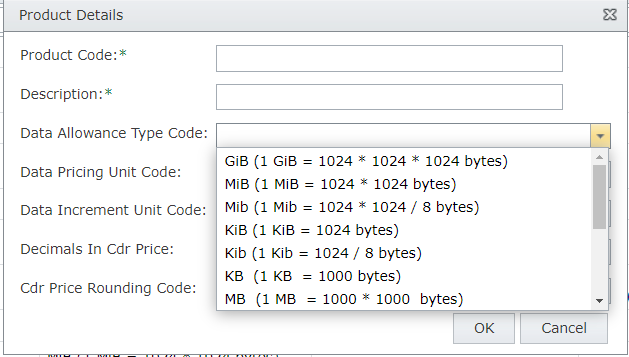
Please refer to Create Price Plan for details of price plan allowance, pricing rules and increments.
Decimals in CDR price
Default representation of CDR price is 2 decimals. If required, for services with very small data and CDR charges, CDR price can be set up with 3 decimals.
CDR Price Rounding Code
Each individual CDR is rounded by the set up code. Default is Mathematical. Please check with your provider how they round their billable CDR prices. If required for very small CDRs, see Decimals in CDR price, the setting can for example be changed to Up.
- Mathematical (default): rounding to the closest digit
- Banker’s : rounding to the closest even digit
- Up
- Down