
Introduction
From 17 March 2025, Starlink has introduced their new pricing structure. In summary, this means that every Service Line is activated on a Network Access Product (resulting in a recurring network access fee), plus one or more recurring Data Block products (resulting in their own recurring fees). Recurring Data Blocks are available in sizes 50 GB and 500 GB, with the 500 GB blocks being 50% cheaper in price per GB.
The other change is that out of bundle traffic is also invoiced in blocks of 50 GB, which at the same price as the 50GB recurring blocks.
In the Starlink portal, during activation of a KIT you select the Network Access Product, plus one or more of the recurring Data Blocks. After activation, you can modify the service line by adding additional data blocks; these can either be recurring or one-off.
For information about new Starlink Pool products, please see last paragraph of this page.
Starlink product datablocks
Starlink product Data Blocks can be configured in the Starlink Products reference table, under Menu Tools> Reference Tables.
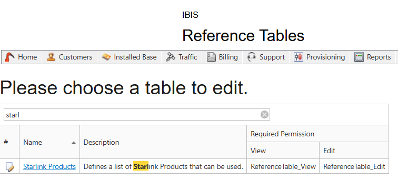
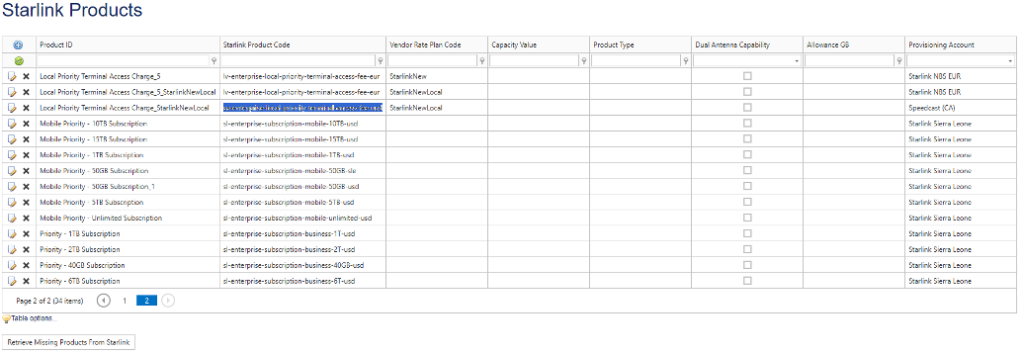
To get started here, first press the button “Retrieve Missing Products From Starlink”.
This will make sure you have the latest products from Starlink.
Previously, this list of products would contain a specific product type (global or local) and a specific amount of allowance.
For example, us-enterprise-subscription-mobile-10TB-usd.
This product would then be given a Vendor Rate Plan Code so it could be linked to a price plan.
Now with the new billing structure, it’s only an access fee product. This product needs to be configured with a combination of Data Blocks (currently only 50GB and 500GB are available). These configurations are created for the Vendor Rate Plan that is assigned to these products. This will result in a new product entry per Data Block configuration. So instead of having “us-enterprise-subscription-mobile-10TB-usd”. You would have “us-enterprise-local-priority-terminal-access-fee-usd” with a Vendor Rate plan that is configured with 20 datablocks of 500GB each. For a 500GB product. You will have the same “us-enterprise-local-priority-terminal-access-fee-usd” product, but with a Vendor Rate plan that is configured with only 1 Data Block of 500GB.
For an activation, these connections would look something like this.
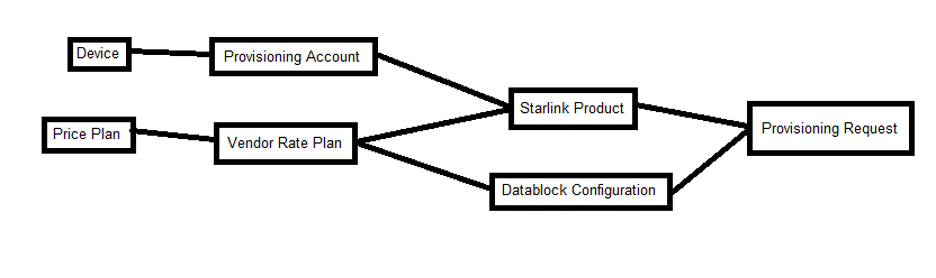
Configuring Data Blocks can be done with the following new addition to the Starlink Products screen.
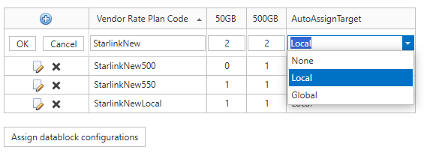
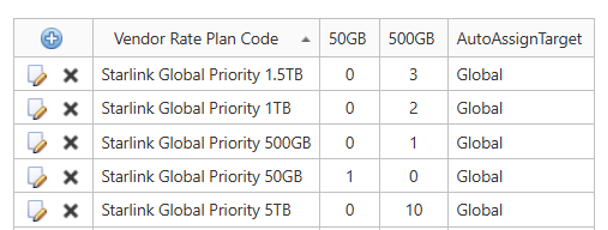
As shown here, Data Blocks are configured per Vendor Rate Plan Code. This allows you to keep re-using the same code for similar products on different Starlink Accounts.
Use [+] in the upper left corner to add a new entry. This requires :
- Vendor Rate Plan Code : The code that you want to configure the datablocks for.
- 50GB/500GB : The number of 50GB/500GB datablocks. For example 2 data blocks of 500GB results in 1000GB of allowance.
- NOTE: Enter specifically value 0 for the datablock field not used.
- AutoAssignTarget : This is to help automate assigning the used Vendor Rate Plans to Starlink Products. More on this later.
The

buttons are used to edit or delete existing configurations.
NOTE: create all possible vendor rate plan codes with data blocks that are required to be associated with the customer price plans.
In order to assist assigning these Vendor Rate Plan Code configurations to Starlink Products, press [Assign datablock configurations]
This will attempt to assign the configured Vendor Rate Plans to the supported Starlink Accounts, by creating product entries with these Rate Plans assigned to them. For this purpose, the AutoAssignTarget is used. Each supported Starlink account will have a local and/or global access fee product with possible data blocks. A Vendor Rate plan can not be assigned to multiple products on the same account, so you will need to make configurations for local and global products separately. The AutoAssignTarget indicates if the configuration should be automatically assigned to local or global products.
Example: Vendor rate plans Starlink Global 50GB, 500GB, 1TB, 1.5TB and 5TB are created with datablocks and the AutoAssignTarget Global is enabled. When selecting Assign data block configurations, for every Starlink account with Global Terminal Access there will be 5 Product configurations created: 50GB, 500GB, 1TB, 1.5TB and 5TB.
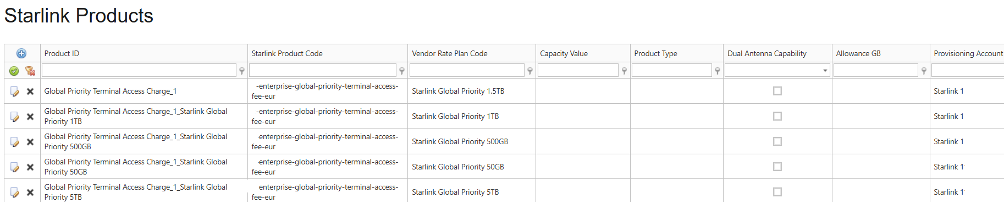
In case of a special configuration, you can assign manually. Simply create a new Starlink product and use a configured Vendor Rate Plan Code (AutoAssignTarget set to None).
Starlink Price Plans
To us the new Starlink Products for provisioning and billing the following needs to be done:
- Update Vendor Rateplan to the new configured Vendor rateplans with Data blocks:
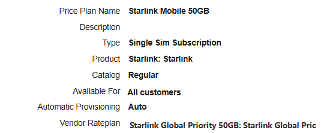
2. (optional) Update Pricing rules* to include the automatic tops ups (when opt-in is selected in the Starlink provisioning)
The “automatic topups” that Starlink has implemented are NOT implemented as allowance structures in IBIS. Instead, they are modelled as out-of-bundle traffic. What will differ is that the pricing rules for Priority data will be using a 50 GB increment per month. This will cause the 50 GB increment to not be applied to the terminal’s CDRs, but to the Invoice Line that accounts for the out of bundle traffic.
*best practice is to end date current pricing rules and create new pricing rules per May 1st.

All Starlink traffic is now MOBILE. It is not required anymore to create pricing rules for service variant FIXED.
Next development
Where this phase focusses on making sure using the standard IBIS price plans can be continued, in a next phase we will introduce the flexibility that Starlink offers. This will include options to:
- Do one off allowance topups: For subscriptions that are (almost) out of allowance in their current month, the user can do a one-off allowance top up that will top up their allowance against a price that is dictated as a VAS price in their price plans.
- Do recurring allowance extensions. With this option, during an activation or on an existing subscription, the user can specify a number of additional recurring allowance blocks, which will extend their monthly allowance beyond the default allowance blocks that are implied by the price plan. So for instance, a 1 TB price plan is backed by a 1 TB vendor plan, which implies 2x500GB recurring Data Blocks. A customer can now decide that they want 1.5 TB, by adding an extra recurring 500GB block to their subscription. This will produce an extra recurring fee that will be invoiced on a monthly basis, next to their regular subscription fee.
Additional recurring allowance can also be removed. From the subscription, causing the additional fee to be terminated as well.
Starlink Pool products
With the new plan structure Starlink introduced new products for Pools as well. Starlink offers Global and Local Priority Pooled Data Terminal Access products. The Vendor Rate Plan Code should be entered on the product itself, as there are no data blocks applicable. The simplest solution is to remove the Vendor Rate Plan Code from the old Pool product and add that to the new Pool product. As the Pool products have the name Global and Local incorporated, please be mindful of the auto-assign feature of data blocks for Global and Local access plans. If they are created in error, these should not be used. (if they are used, provisioning will fail anyway as data blocks are not compatible with pool products)