NOTE: cost price fields in price plans are not enabled by default. If requires, please start a billing support ticket.
Below screenshot shows how the charge of a CDR provided by the vendor/airtime provider is represented in IBIS. In the traffic pivot table these charges can be pulled in a report by selecting the field Cost or Cost specified by Vendor.
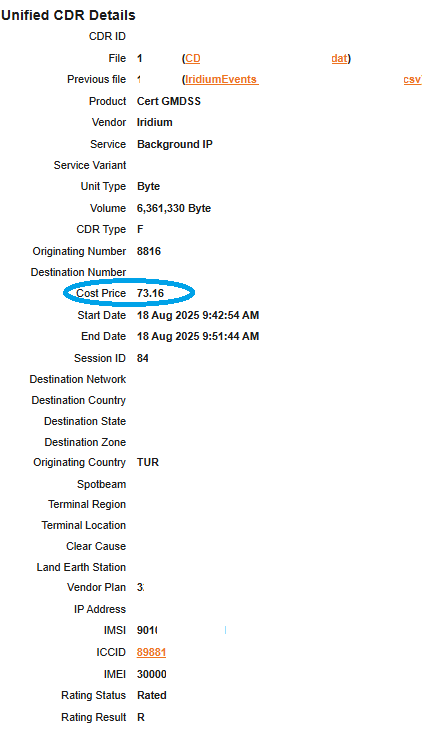
Not all vendor CDRs have cost information in their CDRs. As the cost price per unit is usually known this information can be entered by the biller in the pricing rules. IBIS will then calculated the cost price based on this input.
Cost price filled in pricing rules:

The cost price can be pulled in the traffic pivot by selecting the field Cost Calculated.
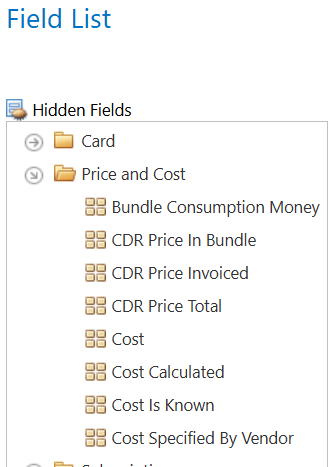
Cost = Costprice in CDR, specified by Vendor, if not available Cost Calculated will be pulled (per Cost field in pricing rules)
*Cost is Known= flag for reporting on cost price.
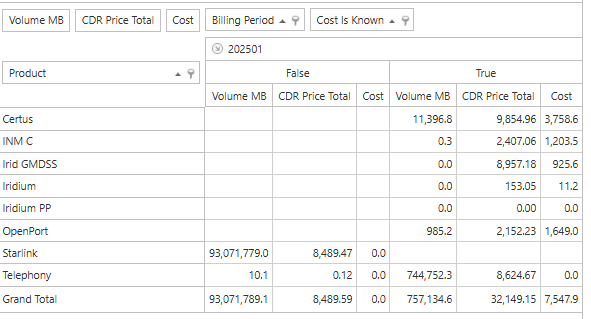
To make sure the report reflects the the prices (selling charge to customer) and cost (purchase charge from vendor) for the usage where the cost price is either specified by Vendor or calculated based on information in the pricing rules it is important to flag Cost is Known. This will filter out CDRs where there is no cost price information available.
Example: