
A SIM card user profile is typically created during the activation process of a SIM. However, it is possible to create a user profile on an active or non active SIM card outside of the activation process. The following details provides instruction on how to do this.
Navigate to the Card/Terminal details page. This can be done either by searching the ICCID or from the Install Base>Devices page.
On the [Card/Terminal details page], click on [NEW] under the [User Profile IP addresses] section.

The user profile details page will display
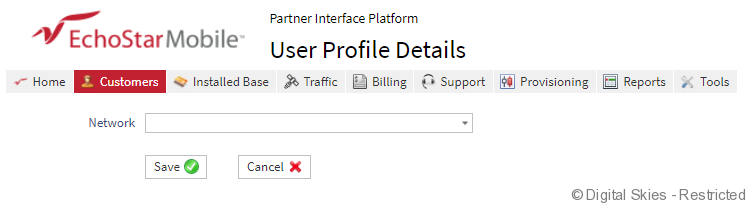
Click the drop down menu next to [Network] and select the required PoP network for the user profile. The following fields will appear to be completed:
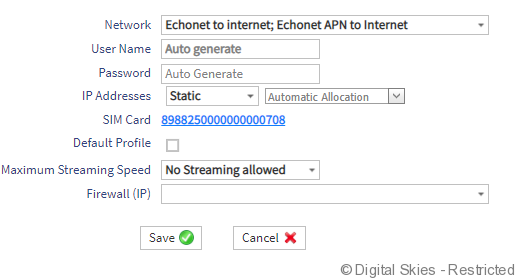
Username and Password – Can be automatically generated or created manually.
IP Addresses – EM currently only use private static IPs. The IP can be automatically allocated or manually selected.
Default Profile – If the profile is to be default, please ensure the [Default Profile] is ticked.
Maximum Streaming Speed – Select the maximum required data speed for the user profile. Please note this will be product specific. e.g. Momentum product will not show streaming options as it is not available as part of the product offering.
Firewall – Select the required firewall for this profile. All profiles require a firewall to be applied. For firewall information, check here
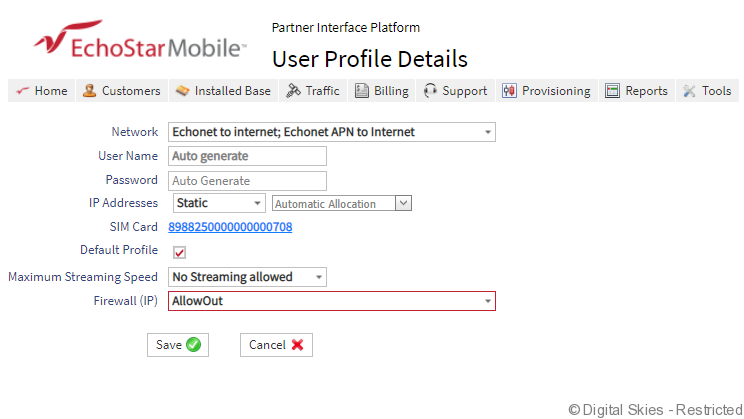
Click [Save]
The PIP will create the order for the User profile

Once the order is complete, the User Profile details will be visible on the Card/Terminal details page.
