
When a customer has a lost or broken SIM card, this needs to be replaced without changing the running subscription. In IBIS this process is called a SIM Swap.
NOTE: a SIM card with status Data Suspended should have service resumed before processing the SIM Swap.
SIM Swaps are initiated as follows:
- Look up the subscription of the SIM card that needs to be replaced. (In case of a rebiller customer account, the swap process needs to be initiated in the subscription in the rebiller platform)
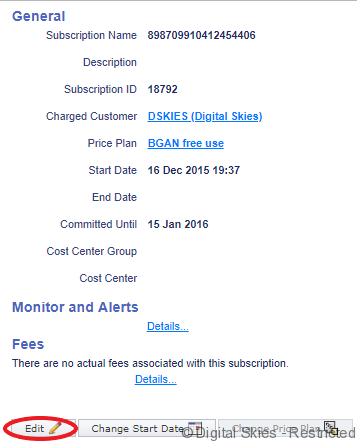
- On the subscription details screen, click the Edit button. IBIS will now show a Swap button underneath the list of the SIM cards (provided you have sufficient permissions).
3. Click on the Swap button to navigate to the SIM swap screen.
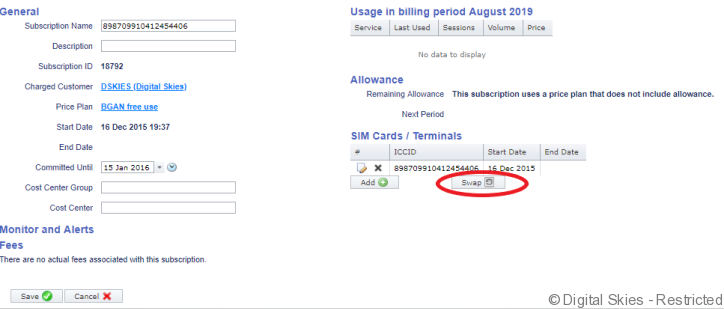
On the SIM swap screen, you can make the following selections:
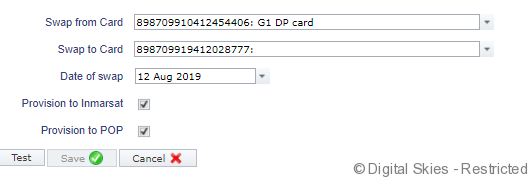
- Swap from Card: select a card from the subscription that must be replaced.
- Swap to Card: select the card that will replace the old one. The new card must be a non-activated card of the same product and belonging to the same provisioning account as the old one. The selected card must be assigned to the customer account.
- Date of swap: for a normal sim swap, do not override the default date. If needed, you can also schedule the swap for a future date, or select a date in the past. Back-dating a sim swap is only used when the provisioning of the SIM swap has already happened in the past via a different provisioning platform.
- Provision to provider: This option is only available if IBIS knows how to provision this SIM card (it needs to have an Active provisioning status). In normal situations, don’t override the default setting.
- Provision to POP: This option is only available if the original sim card was provisioned to the pop, in which case the swap also needs to be sent to the pop in order to transfer the data service from the old to the new card. In normal situations, don’t override the default setting.
Once the selections have been made, click the Test button to let IBIS validate the configuration, and click Save to commit the transaction.
IBIS will now create and process a provisioning task to handle the provisioning to the POP and to Inmarsat or Iridium. After the provisioning has been completed, IBIS will update the billing administration:
- If the subscription had the original SIM card’s ICCID in its name, this will be replaced with the new SIM card’s ICCID.
- The original SIM card’s membership in the subscription is ended per the swap date, and the new one is added per that date.
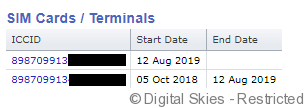
- The old sim card gets provisioning status Substituted, and the new one Active.
- Biller note on the replacement SIM card detail page will show note of the replacement and date

- The new SIM card will get the same service configuration, and the same MSISDN numbers as the original one.
- Any Traffic Monitors active on the original SIM card will be switched to the new SIM card
- Any recurrent Fee will move be ended for the original card and started on the new card per the 1st of the Month.
SIM swaps are by default not made available to external user roles. The main reason for this is that some providers (in particular: Iridium) charge a SIM swap fee, whereas IBIS does not automatically generate a fee for SIM swaps. Consequently, if the customer needs to be charged for the SIM swap, a one off fee needs to be added manually to the subscription after the swap has been initiated.