
Once a Secondary Data Flow has been set up (please refer to Secondary Data Flow set up), it needs to be added to a priceplan. Before traffic can be generated and invoiced, it needs to be added to a SIM card (please refer to Adding a Secondary Data Flow to a SIM card)
When the SDF is created on the Iridium side, it is designated a three digit code, which is used to identify the traffic so that it can be rated correctly. In the IBIS raw CDRs this field is called “unused”, but in the rated CDRs it is included in the Service Variant field. When a SDF is created, the service variant is already made available in IBIS for inclusion in price plans.
As traffic is generated on the SDF, when the traffic CDRs are processed the SDF code is added to IBIS as a Service Variant. .
Adding the SDF to the Pricing Plans
From the [Billing] menu select [Manage Priceplans] to edit the priceplan you want to add the SDF to.
SDF is implemented as a service variant on the Background IP service.
From the dropdown menu, select the SDF you want to price. It is possible to create multiple service variants on one Iridium Certus subscription, this can be done sequentially.
The pricing of the traffic as well as the increments of the traffic can be set for the SDF, which will rate it separately from the other Background IP traffic.
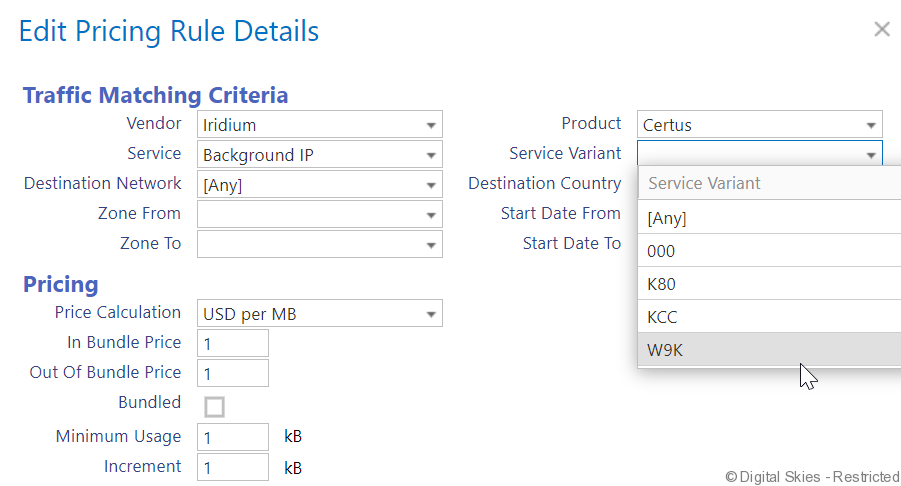
Save the price plan, ensuring that the Service Variant is listed above the background IP variant.

As of now, the SDF traffic will be rated as per this price. Any CDRs on the error list will be automatically picked up and rated. No additional actions are required during the invoicing process. In the rated traffic overview, the Secondary Data Flow is visible in the [Variant] column.
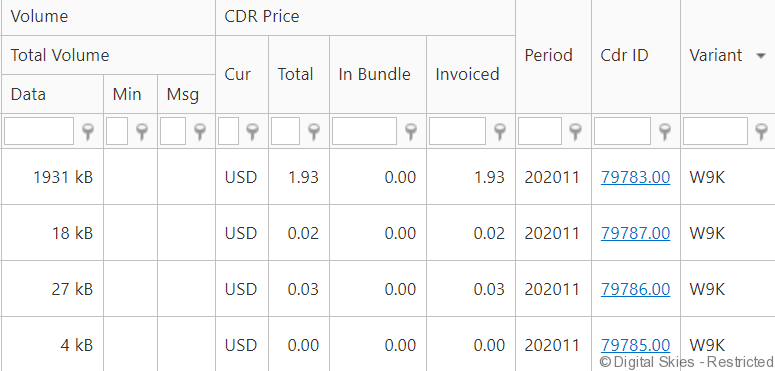
Pricing levels:
Pricing levels for SDF can be different depending on the use of the data network and this is up to the SP to implement. Whereas data traffic for engine management may be charged at a premium price, data traffic for a prepaid system (where usage is charged via a proprietary prepaid system, for example) would be 0 rated.