Before adding the Secondary Data Flow to an Iridium Certus SIM card, ensure the first two steps have been completed:
- Creating the Secondary Data Flow: Secondary Data Flow set up
- Including the Secondary Data Flow traffic in a pricing plan Secondary data flow traffic rating and invoicing
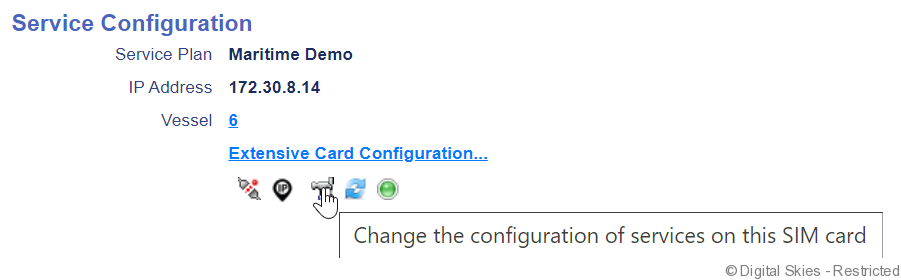
Go to the SIM card details screen of the SIM card that the SDF needs to be enabled on. On the bottom right of the page select [Extensive Card Configuration], which will open the configuration wizard screen.
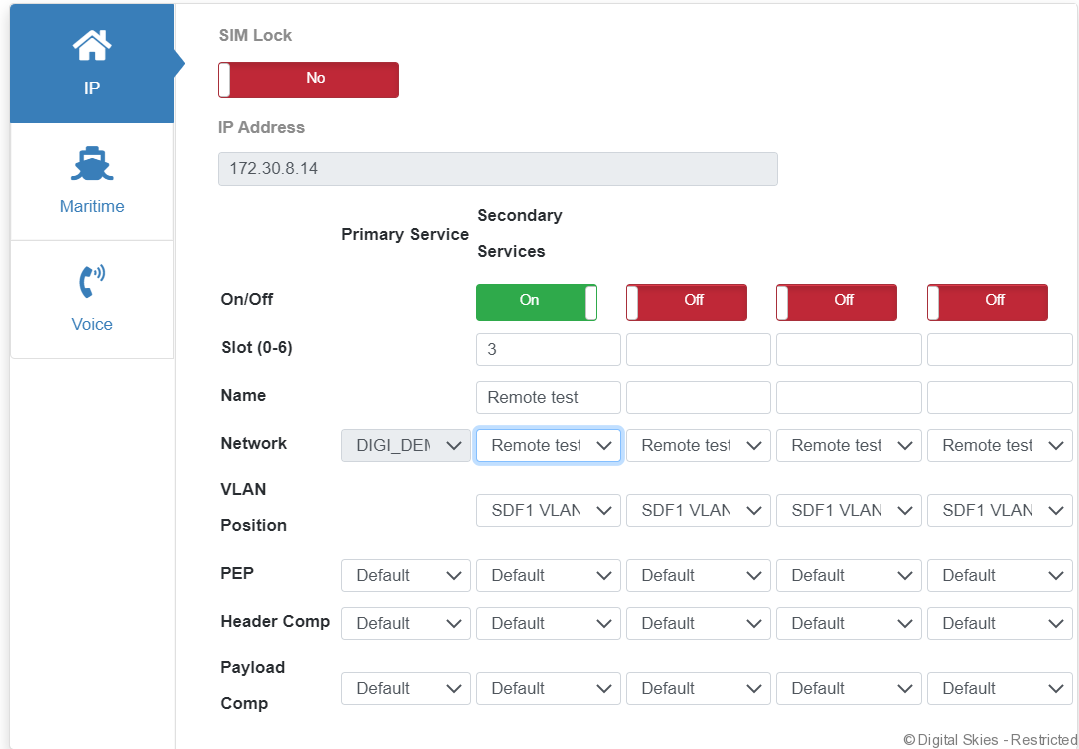
- There are four positions to enable SDF, that can accomodate four different SDFs. In order to enable a slot, switch the on/off to [on]
- The slot refers to the traffic priority, and can be filled out with the numbers 2 to 6.
- The network selected is the name of the SDF that is to be used. Note that the SDF has to be made available to the customer owning the SIM card for it to show in this list.
- The VLAN position is by default taken from the SDF, but can be overridden here
- Unless otherwise required, leave the PEP and compression settings default.
Press [Next] to go to the Billing overview, where additional fees can be added if required.
Press [Next] to go to the summary screen and then press [Finish].
The SDF is now enabled on the SIM card and traffic going through this will now be rated as per the price plan.