
The key difference between iVent device management and the other airtime services described in the Knowledge Base is that iVent is using the EID to identify the SIM cards. An EID has 32 positions and as an example, can look like this: 89044045817727484800000046650000.
In the MySIM Retail portal, there is no reference to EID. Instead the common identifier is ICCID. There is no reference in MySim Retail to any iVent ICCIDs that may be on the SIM card.
This is an overview of the Card/Terminal details page.
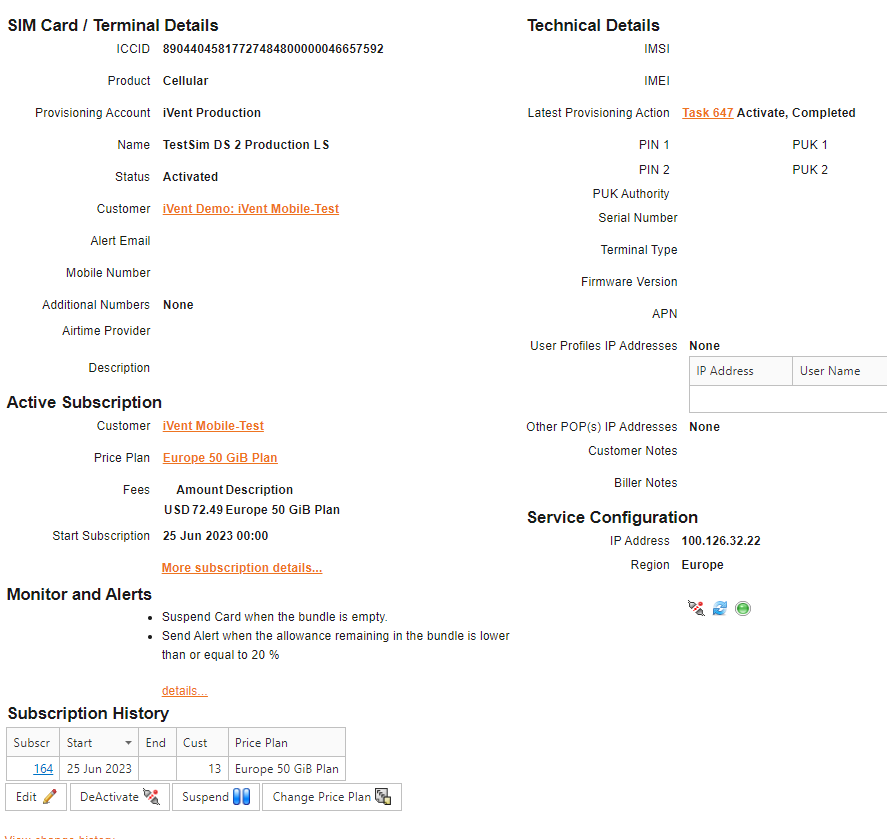
This page is split into different sections detailed below:
SIM Card/Terminal details
- ICCID – ICCID number of the SIM, in case of iVent the number displayed here is the EID
- The product the SIM is assigned to, in case of iVent this is always cellular
- Name given to the card – This is a free text field, which can be updated by iVent or by an iVent customer
- Status of this SIM – Activated, Not Activated, Deactivated, Suspended. Please note that the status “deactivated” indicates that the SIM card is suspended in the iVent system, and there is no active subscription on the SIM card in MySIM Retail. The status “suspended” also indicates that the SIM card is suspended in the iVent system, however there is an active subscription on the card in MySIM Retail and the customer will be charged the monthly fee.
- Customer – The iVent customer who owns the SIM card
- Email Alert – Email address used for alerting someone about monitoring and specific to the SIM card.
Active Subscription
- Price Plan – Provides details of the price plan the SIM is activated on.
- Start Subscription – Date the subscription started
Monitor and Alerts
- Lists any monitors or alerts set up against the SIM/Subscription. This section can be expanded by clicking on details link. Please note that monitors on the SIM Card level can be part of the price plan as set-up by iVent, or can be added by the iVent customer.
Subscription History
- Provides details of current and previous subscriptions the card has been activated against including start and end dates.
Usage (info provided by CDRs)
- Last Session Start – The start time of the most recent call/data session.
- Last Session End – The end time of the most recent session. If the session is still open, it will indicate this here.
Technical Details
The fields in this segment of the page are not applicable to iVent SIM cards.
Service Configuration (Info from the iVent network)
- IP address
- Region – Indicates which region the SIM card is on in the iVent system. This should match the region on the price plan.