
The category of the Service Notification describes the element of the service that a notification is created for. This may be for example for an airtime service (if the airtime vendor has announced an outage) or for a Value Added Service. It is up to the IBIS admin to determine and implement these categories.
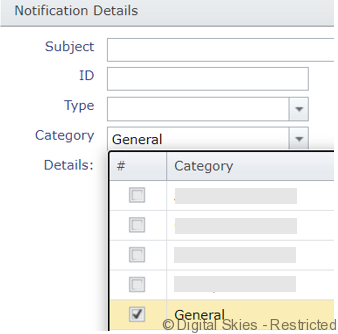
Selecting the right category
When creating a Service Notification, it is important to select the correct category that the notifications apply to. If the category that is required is not available, this can be added by the IBIS admin.
Ensuring the customers will receive the notification
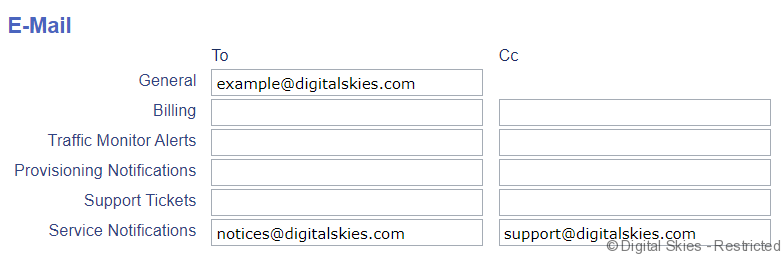
In order to ensure the customer will receive the notification, the customer has to have an email address filled out on the [customer details] page. This may be the [general] email address, or the email address field specifically designed for notifications.
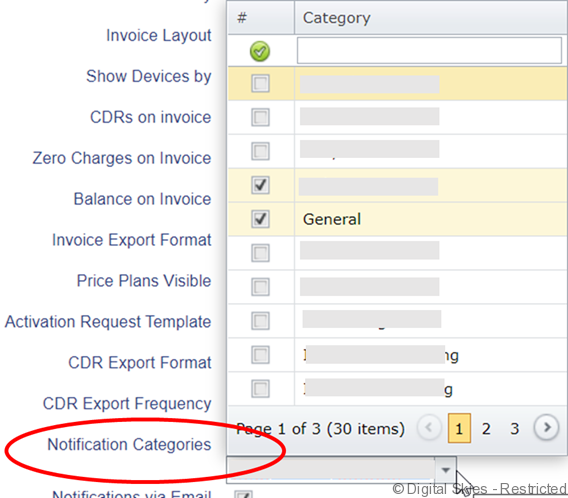
Important: the categories for which they want to receive notifications also has to be selected, otherwise they will not receive the notifications.
Setting up new categories
Categories are set up in the Reference Tables part of the [Tools] menu, this is an admin functionality. If a new category has been set up, it is important to add this to all customers that need to receive the notification.